Netty权威指南(二)
6 编解码技术
在Netty的NIO网络开发中,当进行远程跨进程服务调用时,需要把被传输当java对象编码为字节数组或者ByteBuffer对象,而当远程服务读取到BtyeBuffer对象或者字节数组时,需要将其解码为发送时的java对象。
6.1 Java序列化的缺点
- 无法跨语言
- 序列化后的码流太大
- 序列化性能太低
6.2 主流编解码框架
- Protobuf
- Thrift
7 MessagePack编解码
7.1 MessagePack优点
- 编解码高效
- 序列化后码流小
- 跨语言
7.2 MessagePack 编解码器开发
7.2.1 MessagePack编码器开发
MessagePack 编码器
/**
 * MessagePack 编码器
 * @author likecat
 * @version 1.0
 * @date 2022/10/19 11:47
 */
public class MsgpackEncoder extends MessageToByteEncoder<Object> {
    @Override
    protected void encode(ChannelHandlerContext channelHandlerContext, Object o, ByteBuf byteBuf) throws Exception {

        MessagePack msgpack = new MessagePack();
        byte[] raw = msgpack.write(o);
        byteBuf.writeBytes(raw);
    }
}
7.2.2 MessagePack解码器开发
MessagePack 解码器
/**
 * MessagePack 解码器
 * @author likecat
 * @version 1.0
 * @date 2022/10/19 11:52
 */
public class MsgpackDecoder extends MessageToMessageDecoder<ByteBuf> {
    @Override
    protected void decode(ChannelHandlerContext channelHandlerContext, ByteBuf byteBuf, List<Object> list) throws Exception {

        //首先从数据包bytebuf中获取需要解码的字节数组,然后用MessagePack的read方法将其反序列化为object对象
        final byte[] array;
        final int length = byteBuf.readableBytes();
        array = new byte[length];

        byteBuf.getBytes(byteBuf.readerIndex(), array, 0, length);
        MessagePack messagePack = new MessagePack();

        list.add(messagePack.read(array));
    }
}
7.2.3 运行
服务端 -》EchoMsgServer
public class EchoMsgServer {
    public void bind(int port) throws Exception {
        // 配置服务端的NIO线程组
        // 服务端接受客户端的连接
        NioEventLoopGroup bossGroup = new NioEventLoopGroup();
        // 进行SocketChannel的网络读写
        NioEventLoopGroup workerGroup = new NioEventLoopGroup();
        try {
            ServerBootstrap b = new ServerBootstrap();
            b.group(bossGroup, workerGroup).channel(NioServerSocketChannel.class)
                    .option(ChannelOption.SO_BACKLOG, 100)
                    .handler(new LoggingHandler(LogLevel.INFO))
                    .childHandler(new ChannelInitializer<SocketChannel>() {

                        @Override
                        protected void initChannel(SocketChannel ch) throws Exception {
                            ch.pipeline().addLast("frameDecoder",new LengthFieldBasedFrameDecoder(65535, 0, 2,0,2));
                            // 添加msgpack的编码和解码器
                            ch.pipeline().addLast("msgpack decoder",new MsgpackDecoder());
                            ch.pipeline().addLast("frameEncoder",new LengthFieldPrepender(2));
                            ch.pipeline().addLast("msgpack encoder",new MsgpackEncoder());
                            // 添加自定义的处理器
                            ch.pipeline().addLast(new EchoMsgServerHandler());

                        }
                    });

            // 绑定端口,同步等待成功
            ChannelFuture f = b.bind(port).sync();
            // 等待服务端监听端口关闭
            f.channel().closeFuture().sync();
        }catch(Exception e){
            e.printStackTrace();
        } finally {
            // 优雅退出,释放线程池资源
            bossGroup.shutdownGracefully();
            workerGroup.shutdownGracefully();
        }
    }

    public static void main(String[] args) throws Exception {
        int port = 8080;
        if(args!=null && args.length > 0){
            try{
                port = Integer.valueOf(args[0]);
            }catch(NumberFormatException e){
                // 采用默认值
            }
        }
        new EchoMsgServer().bind(port);
    }
}
服务端 -》EchoMsgServerHandler
public class EchoMsgServerHandler extends ChannelInboundHandlerAdapter {

    @Override
    public void channelRead(ChannelHandlerContext ctx, Object msg) throws UnsupportedEncodingException {
        System.out.println("server receive the msgpack message :"+msg);
        ctx.writeAndFlush(msg);
    }

    @Override
    public void exceptionCaught(ChannelHandlerContext ctx, Throwable cause) {
        // Close the connection when an exception is raised.
        cause.printStackTrace();
        ctx.close();
    }
}
客户端 -》EchoMsgClient
public class EchoMsgClient {

    private final String host;
    private final int port;
    private final int sendNumber;

    public EchoMsgClient(String host, int port, int sendNumber) {
        this.host = host;
        this.port = port;
        this.sendNumber = sendNumber;
    }

    public void run() throws Exception {

        //配置nio线程组
        EventLoopGroup group = new NioEventLoopGroup();

        try{
            Bootstrap b = new Bootstrap();
            b.group(group).channel(NioSocketChannel.class)
                    .option(ChannelOption.TCP_NODELAY, true)
                    .option(ChannelOption.CONNECT_TIMEOUT_MILLIS,3000)
                    .handler(new ChannelInitializer<SocketChannel>() {
                        @Override
                        protected void initChannel(SocketChannel socketChannel) throws Exception {
                            //为了处理半包消息,添加如下两个 Netty 内置的编解码器
                            //LengthFieldPrepender:前置长度域编码器——放在MsgpackEncoder编码器前面
                            //LengthFieldBasedFrameDecoder:长度域解码器——放在MsgpackDecoder解码器前面
                            socketChannel.pipeline().addLast("frameDecoder",new LengthFieldBasedFrameDecoder(65535, 0, 2,0,2));
                            // 添加msgpack的编码和解码器
                            socketChannel.pipeline().addLast("msgpack decoder",new MsgpackDecoder());
                            socketChannel.pipeline().addLast("frameEncoder",new LengthFieldPrepender(2));
                            socketChannel.pipeline().addLast("msgpack encoder",new MsgpackEncoder());
                            socketChannel.pipeline().addLast(new EchoMsgClientHandler(sendNumber));//接收消息
                        }
                    });

            //发起异步连接操作
            ChannelFuture f = b.connect(host, port).sync();
            //等待客户端链路关闭
            f.channel().closeFuture().sync();
            //优雅退出,释放NIO线程组
        }finally {
            group.shutdownGracefully();
        }


    }

    public static void main(String[] args) throws Exception {
        int port = 8080;

        if(args != null && args.length > 0){
            try {
                port = Integer.valueOf(args[0]);
            } catch (NumberFormatException e) {
                e.printStackTrace();
            }
        }
        new EchoMsgClient("127.0.0.1",port,10).run();
    }
}
客户端 -》EchoMsgClientHandler
public class EchoMsgClientHandler extends ChannelInboundHandlerAdapter {
    private final int sendNumber;

    public EchoMsgClientHandler(int sendNumber) {
        this.sendNumber = sendNumber;
    }

    @Override
    public void channelActive(ChannelHandlerContext ctx){
        UserInfo[] infos = UserInfo();
        for (UserInfo in:infos ) {
            ctx.writeAndFlush(in);
        }
        ctx.writeAndFlush("我是普通的字符串消息" + Thread.currentThread().getName());
    }

    private UserInfo [] UserInfo(){
        UserInfo[] userInfos = new UserInfo[sendNumber];
        UserInfo userInfo = null;
        for (int i = 0; i < sendNumber; i++) {
            userInfo = new UserInfo();
            userInfo.setAge(i);
            userInfo.setUserName("ABCDEFG ---->" + i);
            userInfos[i] = userInfo;
        }
        return userInfos;
    }
    @Override
    public void channelRead(ChannelHandlerContext ctx,Object msg){
        System.out.println("Client receive the msgpack message: [" + msg + "]");
    }

    @Override
    public void exceptionCaught(ChannelHandlerContext ctx,Throwable cause){
        ctx.close();
    }

    @Override
    public void channelReadComplete(ChannelHandlerContext ctx){
        ctx.flush();
    }
}
8 HTTP多协议开发和应用
8.1 Netty HTTP服务端入门开发
基于NIO TCP协议栈开发的HTTP协议栈也是异步非阻塞的。
文件服务器启动类
public class HttpFileServer {

    private static final String DEFAULT_URL = "/src/main/java/com/likecat/netty/";

    public void run(final int port, final String url) throws Exception {
        EventLoopGroup bossGroup = new NioEventLoopGroup();
        EventLoopGroup workerGroup = new NioEventLoopGroup();
        try {
            ServerBootstrap b = new ServerBootstrap();
            b.group(bossGroup, workerGroup).channel(NioServerSocketChannel.class)
                    .childHandler(new ChannelInitializer<SocketChannel>() {
                        @Override
                        protected void initChannel(SocketChannel ch) throws Exception {
                            // 添加请求消息解码器
                            ch.pipeline().addLast("http-decoder", new HttpRequestDecoder());
                            //HttpObjectAggregator的作用 将多个消息转换为单一的FullHttpRequest或者FullHttpResponse
                            ch.pipeline().addLast("http-aggregator", new HttpObjectAggregator(65536));
                            // 添加响应解码器
                            ch.pipeline().addLast("http-encoder", new HttpResponseEncoder());
                            // 支持异步发送大的码流(大的文件传输),但不占用过多的内存,防止java内存溢出
                            ch.pipeline().addLast("http-chunked", new ChunkedWriteHandler());
                            // 添加自定义handler 处理文件服务器业务逻辑
                            ch.pipeline().addLast("fileServerHandler", new HttpFileServerHandler(url));
                        }
                    });
            ChannelFuture future = b.bind("127.0.0.1", port).sync();
            System.out.println("HTTP文件目录服务器启动,网址是 : " + "http://127.0.0.1:" + port + url);
            future.channel().closeFuture().sync();
        } finally {
            bossGroup.shutdownGracefully();
            workerGroup.shutdownGracefully();
        }
    }

    public static void main(String[] args) throws Exception {
        int port = 8080;
        if (args.length > 0) {
            try {
                port = Integer.parseInt(args[0]);
            } catch (NumberFormatException e) {
                e.printStackTrace();
            }
        }
        String url = DEFAULT_URL;
        if (args.length > 1)
            url = args[1];
        new HttpFileServer().run(port, url);
    }
}
文件服务器处理类
public class HttpFileServerHandler extends SimpleChannelInboundHandler<FullHttpRequest> {

    private final String url;

    public HttpFileServerHandler(String url) {
        this.url = url;
    }

    @Override
    public void messageReceived(ChannelHandlerContext ctx, FullHttpRequest request) throws Exception {
        // 解码失败 400
        if (!request.getDecoderResult().isSuccess()) {
            sendError(ctx, BAD_REQUEST);
            return;
        }
        // 只支持get方法
        if (request.getMethod() != GET) {
            sendError(ctx, METHOD_NOT_ALLOWED);
            return;
        }
        //
        final String uri = request.getUri();
        // 处理Uri地址
        final String path = sanitizeUri(uri);

        if (path == null) {
            sendError(ctx, FORBIDDEN);
            return;
        }
        File file = new File(path);
        // 如果文件不存在,或不可访问
        if (file.isHidden() || !file.exists()) {
            sendError(ctx, NOT_FOUND);
            return;
        }
        // 如果请求是文件夹
        if (file.isDirectory()) {
            // 请求以 '/'结尾,列出该文件夹下的所有内容
            if (uri.endsWith("/")) {
                sendListing(ctx, file);
            } else {
                // 否则自动补全'/' 然后再重定向访问
                sendRedirect(ctx, uri + '/');
            }
            return;
        }

        if (!file.isFile()) {
            sendError(ctx, FORBIDDEN);
            return;
        }
        RandomAccessFile randomAccessFile = null;
        try {
            randomAccessFile = new RandomAccessFile(file, "r");// 以只读的方式打开文件
        } catch (FileNotFoundException fnfe) {
            sendError(ctx, NOT_FOUND);
            return;
        }
        long fileLength = randomAccessFile.length();
        // 创建一个默认的Http响应
        HttpResponse response = new DefaultHttpResponse(HTTP_1_1, OK);
        // 设置响应文件大小
        setContentLength(response, fileLength);
        // 设置 content Type
        setContentTypeHeader(response, file);
        // 设置 keep alive
        if (isKeepAlive(request)) {
            response.headers().set(CONNECTION, HttpHeaders.Values.KEEP_ALIVE);
        }
        ctx.write(response);
        ChannelFuture sendFileFuture;
        //通过Netty的ChunkedFile对象直接将文件写入发送到缓冲区中
        sendFileFuture = ctx.write(new ChunkedFile(randomAccessFile, 0, fileLength, 8192), ctx.newProgressivePromise());
        sendFileFuture.addListener(new ChannelProgressiveFutureListener() {
            @Override
            public void operationProgressed(ChannelProgressiveFuture future, long progress, long total) {
                if (total < 0) { // total unknown
                    System.err.println("Transfer progress: " + progress);
                } else {
                    System.err.println("Transfer progress: " + progress + " / " + total);
                }
            }

            @Override
            public void operationComplete(ChannelProgressiveFuture future) throws Exception {
                System.out.println("Transfer complete.");
            }
        });
        ChannelFuture lastContentFuture = ctx.writeAndFlush(LastHttpContent.EMPTY_LAST_CONTENT);
        //如果不支持keep-Alive,服务器端主动关闭请求
        if (!isKeepAlive(request)) {
            lastContentFuture.addListener(ChannelFutureListener.CLOSE);
        }
    }

    @Override
    public void exceptionCaught(ChannelHandlerContext ctx, Throwable cause) throws Exception {
        cause.printStackTrace();
        if (ctx.channel().isActive()) {
            sendError(ctx, INTERNAL_SERVER_ERROR);
        }
    }

    private static final Pattern INSECURE_URI = Pattern.compile(".*[<>&\"].*");

    /**
     * 格式化uri并且获取路径
     * @param uri
     * @return
     */
    private String sanitizeUri(String uri) {
        try {
            uri = URLDecoder.decode(uri, "UTF-8");
        } catch (UnsupportedEncodingException e) {
            try {
                uri = URLDecoder.decode(uri, "ISO-8859-1");
            } catch (UnsupportedEncodingException e1) {
                throw new Error();
            }
        }
        if (!uri.startsWith(url)) {
            return null;
        }
        if (!uri.startsWith("/")) {
            return null;
        }
        uri = uri.replace('/', File.separatorChar);
        if (uri.contains(File.separator + '.') || uri.contains('.' + File.separator) || uri.startsWith(".")
                || uri.endsWith(".") || INSECURE_URI.matcher(uri).matches()) {
            return null;
        }
        return System.getProperty("user.dir") + File.separator + uri;
    }

    private static final Pattern ALLOWED_FILE_NAME = Pattern.compile("[A-Za-z0-9][-_A-Za-z0-9\\.]*");

    private static void sendListing(ChannelHandlerContext ctx, File dir) {
        FullHttpResponse response = new DefaultFullHttpResponse(HTTP_1_1, OK);
        response.headers().set(CONTENT_TYPE, "text/html; charset=UTF-8");
        StringBuilder buf = new StringBuilder();
        String dirPath = dir.getPath();
        buf.append("<!DOCTYPE html>\r\n");
        buf.append("<html><head><title>");
        buf.append(dirPath);
        buf.append(" 目录:");
        buf.append("</title></head><body>\r\n");
        buf.append("<h3>");
        buf.append(dirPath).append(" 目录:");
        buf.append("</h3>\r\n");
        buf.append("<ul>");
        buf.append("<li>链接:<a href=\"../\">..</a></li>\r\n");
        for (File f : dir.listFiles()) {
            if (f.isHidden() || !f.canRead()) {
                continue;
            }
            String name = f.getName();
            if (!ALLOWED_FILE_NAME.matcher(name).matches()) {
                continue;
            }
            buf.append("<li>链接:<a href=\"");
            buf.append(name);
            buf.append("\">");
            buf.append(name);
            buf.append("</a></li>\r\n");
        }
        buf.append("</ul></body></html>\r\n");
        ByteBuf buffer = Unpooled.copiedBuffer(buf, CharsetUtil.UTF_8);
        response.content().writeBytes(buffer);
        buffer.release();
        ctx.writeAndFlush(response).addListener(ChannelFutureListener.CLOSE);
    }

    private static void sendRedirect(ChannelHandlerContext ctx, String newUri) {
        FullHttpResponse response = new DefaultFullHttpResponse(HTTP_1_1, FOUND);
        response.headers().set(LOCATION, newUri);
        ctx.writeAndFlush(response).addListener(ChannelFutureListener.CLOSE);
    }

    private static void sendError(ChannelHandlerContext ctx, HttpResponseStatus status) {
        FullHttpResponse response = new DefaultFullHttpResponse(HTTP_1_1, status,
                Unpooled.copiedBuffer("Failure: " + status.toString() + "\r\n", CharsetUtil.UTF_8));
        response.headers().set(CONTENT_TYPE, "text/plain; charset=UTF-8");
        ctx.writeAndFlush(response).addListener(ChannelFutureListener.CLOSE);
    }

    private static void setContentTypeHeader(HttpResponse response, File file) {
        MimetypesFileTypeMap mimeTypesMap = new MimetypesFileTypeMap();
        response.headers().set(CONTENT_TYPE, mimeTypesMap.getContentType(file.getPath()));
    }
}
8.2 Netty HTTP + XML 协议栈开发
自行百度 or 谷歌
9 WebSocket协议开发
9.1 HTTP协议的弊端
- HTTP协议为半双工协议,这就意味着在同一时刻,数据不能同时传输,只能有一个方向的数据传送。
- HTTP消息冗长而繁琐。
- 安全性低。
9.2 WebSocket入门
WebSocket是一种全双工通信协议,浏览器于服务器只需要做一个握手动作 ,就能形成一条快速通道,双方就能互相传送数据。WebSocket基于TCP双向全双工进行消息传递。在同一时刻既可以发送消息,也能接收消息。
WebSocket的特点:
- 单一的TCP连接,采用全双工模式通信。
- 对代理、防火墙和路由器透明
- 无头部信息、Cookie和身份验证
- 无安全开销
- 服务器可以主动传递消息给客户端,无需客户端轮询
- 通过“ping/pong”帧保持链路激活
9.2.1 WebSocket连接建立
建立WebSocket连接时,需要通过客户端或者浏览器发出握手请求,和互动首先要向服务器发出一个HTTP请求,这个请求和通常的HTTP请求不同,包含了一些附加头信息,其中附加头信息“Upgrade:WebSocket”表明这是一个申请协议升级的HTTP请求。服务端解析附加头信息,然后生成应答信息返回客户端,双方的连接就建立了,这个连接会持续存在知道客户端或者服务器的某一方主动关闭连接。
9.2.2 WebSocket生命周期
握手成功之后,服务端和客户端就可以通过“messages”的方式进行通信了,一个消息由一个或者多个帧组成,WebSocket的消息并不一定对应一个特定网络层的帧,它可以被分割成多个帧或者被合并。
帧都有自己对应的类型,属于同一个消息的多个帧具有相同类型的数据。数据类型可以是文本数据、二进制数据和控制帧。
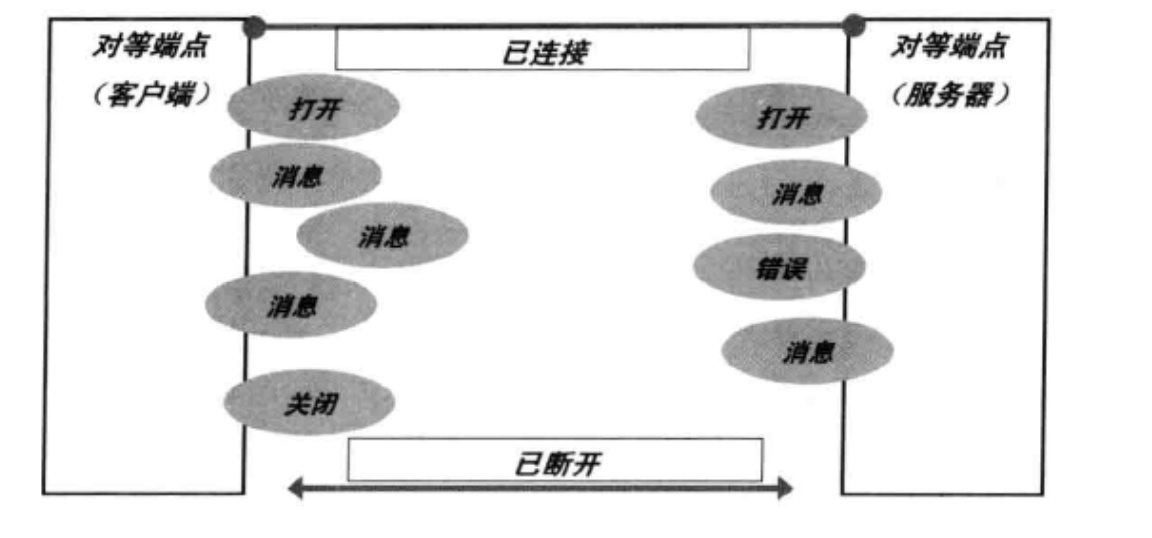
9.2.3 WebSocket连接关闭
为关闭WebSocket连接,客户端和服务端需要通过一个安全的方法关闭底层TCP连接已经TLS会话,丢弃任何可能已经接收的字节,必要时可以通过任何可用的手段关闭连接。
底层的TCP连接在正常情况下应该首先由服务器关闭。再一次情况下客户端可以发起TCP Close。因此当服务器被指示关闭WebSocket连接时,它应该立即发起一个TCP Close操作,客户端应该等待服务器的TCP Close。
WebSocket的握手关闭消息带有一个状态码和一个可选的关闭原因,它必须按照协议要求发送一个Close控制帧,当对端接收到关闭控制帧指令时,需要主动关闭WebSocket连接。
9.3 Netty WebSocket协议开发
9.3.1 WebSocket服务端
WebSocket服务端接收到请求消息之后,先对消息的类型进行盘判断,如果不是WebSocket握手请求消息,则返回400状态码给客户端。服务端对握手请求消息进行处理,构造握手响应返回,双方的socket连接正式建立。连接建立成功后,到被关闭之前,双方都可以主动向对方发送消息。
WebSocketServer
public class WebSocketServer {

    public void run(int port)throws Exception{
        EventLoopGroup bossGroup=new NioEventLoopGroup();
        EventLoopGroup workerGroup=new NioEventLoopGroup();
        try
        {
            ServerBootstrap b=new ServerBootstrap();
            b.group(bossGroup, workerGroup)
                    .channel(NioServerSocketChannel.class)
                    .childHandler(new ChannelInitializer<SocketChannel>()
                    {

                        @Override
                        protected void initChannel(SocketChannel ch)
                                throws Exception
                        {
                            ChannelPipeline pipeline=ch.pipeline();
                            //将请求和应答消息编码或解码为HTTP消息
                            pipeline.addLast("http-codec",new HttpServerCodec());
                            //将HTTP消息的多个部分组合成一条完整的HTTP消息
                            pipeline.addLast("aggregator",new HttpObjectAggregator(65536));
                            //向客户端发送HTML5文件,主要用于支持浏览器和服务端进行WebSocket通信
                            pipeline.addLast("http-chunked",new ChunkedWriteHandler());
                            pipeline.addLast("handler",new WebSocketServerHandler());
                        }

                    });
            Channel f=b.bind(port).sync().channel();
            System.out.println("Web socket server started at port "+port+".");
            System.out.println("Open your browser and navigate to http://localhost:"+port+"/");
            f.closeFuture().sync();
        }
        catch (Exception e)
        {
            e.printStackTrace();
        }
        finally{
            bossGroup.shutdownGracefully();
            workerGroup.shutdownGracefully();
        }
    }

    public static void main(String[] args)throws Exception
    {
        int port =8080;
        try
        {
            if (args!=null&&args.length>0)
            {
                port=Integer.valueOf(args[0]);
            }
        }
        catch (Exception e)
        {
            e.printStackTrace();
        }

        new WebSocketServer().run(port);
    }
}
WebSocketServerHandler
public class WebSocketServerHandler extends SimpleChannelInboundHandler<Object>
{
    private static final Logger logger=Logger.getLogger(WebSocketServerHandler.class.getName());
    private WebSocketServerHandshaker handshaker;

    @Override
    protected void messageReceived(ChannelHandlerContext ctx, Object msg)
            throws Exception
    {
        //判断请求是HTTP请求还是WebSocket请求
        if (msg instanceof FullHttpRequest)
        {
            //处理WebSocket握手请求
            handleHttpRequest(ctx, (FullHttpRequest)msg);
        }else if (msg instanceof WebSocketFrame) {
            //处理WebSocket请求
            handleWebSocketFrame(ctx, (WebSocketFrame)msg);
        }
    }

    @Override
    public void channelReadComplete(ChannelHandlerContext ctx)throws Exception{
        ctx.flush();
    }

    private void handleHttpRequest(ChannelHandlerContext ctx,FullHttpRequest req)throws Exception{
        //先判断解码是否成功,然后判断是不是请求建立WebSocket连接
        //如果HTTP解码失败,返回HTTP异常
        if(!req.getDecoderResult().isSuccess()
                ||(!"websocket".equals(req.headers().get("Upgrade")))){
            sendHttpResponse(ctx,req,new DefaultFullHttpResponse(HttpVersion.HTTP_1_1, HttpResponseStatus.BAD_REQUEST));
        }
        //构造握手工厂创建握手处理类 WebSocketServerHandshaker,来构造握手响应返回给客户端
        WebSocketServerHandshakerFactory wsFactory=new WebSocketServerHandshakerFactory("ws://localhost:8080/websocket", null, false);
        handshaker=wsFactory.newHandshaker(req);
        if(handshaker==null){
            WebSocketServerHandshakerFactory.sendUnsupportedWebSocketVersionResponse(ctx.channel());
        }else {
            handshaker.handshake(ctx.channel(), req);
        }
    }

    //如果接收到的消息是已经解码的WebSocketFrame消息
    public void handleWebSocketFrame(ChannelHandlerContext ctx,WebSocketFrame frame)throws Exception{
        //先对控制帧进行判断
        //判断是否是关闭链路的指令
        if (frame instanceof CloseWebSocketFrame)
        {
            handshaker.close(ctx.channel(), (CloseWebSocketFrame)frame.retain());
            return;
        }
        //判断是否是维持链路的Ping消息
        if (frame instanceof PingWebSocketFrame)
        {
            ctx.channel().write(new PongWebSocketFrame(frame.content().retain()));
            return;
        }
        //本例程仅支持文本消息,不支持二进制消息
        if (!(frame instanceof TextWebSocketFrame))
        {
            throw new UnsupportedOperationException(String.format("%s frame type not supported", frame.getClass().getName()));
        }
        //返回应答消息
        String request=((TextWebSocketFrame)frame).text();
        if(logger.isLoggable(java.util.logging.Level.FINE)){
            logger.fine(String.format("%s received %s", ctx.channel(),request));
        }
        ctx.channel().write(new TextWebSocketFrame(request+" , 欢迎使用Netty WebSocket服务,现在时刻:"+new Date().toString()));
    }

    private void sendHttpResponse(ChannelHandlerContext ctx,FullHttpRequest req,FullHttpResponse resp){
        if(resp.getStatus().code()!=200){
            ByteBuf buf=Unpooled.copiedBuffer(resp.getStatus().toString(),CharsetUtil.UTF_8);
            resp.content().writeBytes(buf);
            buf.release();
            setContentLength(resp,resp.content().readableBytes());
        }
        ChannelFuture f=ctx.channel().writeAndFlush(resp);
        if(!isKeepAlive(resp)||resp.getStatus().code()!=200){
            f.addListener(ChannelFutureListener.CLOSE);
        }
    }

    @Override
    public void exceptionCaught(ChannelHandlerContext ctx,Throwable cause)throws Exception{
        cause.printStackTrace();
        ctx.close();
    }
}
客户端
<!DOCTYPE html>
<html>
  <head>
    <title>Netty WebSocket时间服务器</title>
    <meta name="content-type" content="text/html; charset=UTF-8">
  </head>
  <br>
  <body>
    <br>
    <script type="text/javascript">
    	var socket;
    	if(!window.WebSocket){
    		window.WebSocket=window.MozWebSocket;
    	}
    	if(window.WebSocket){
    		socket=new WebSocket("ws://localhost:8080/webSocket");
    		socket.onmessage=function(event){
    			var ta=document.getElementById('responseText');
    			ta.value="";
    			ta.value=event.data;
    		};
    		socket.onopen=function(event){
    			var ta=document.getElementById('responseText');
    			ta.value='打开WebSocket服务器正常,浏览器支持WebSocket!';
    		};
    		socket.onclose=function(event){
    			var ta=document.getElementById('responseText');
    			ta.value='';
    			ta.value="WebSocket 关闭!";
    		};
    	}else{
    		alert("抱歉,您的浏览器不支持WebSocket协议!");
    	}
    	function send(message){
    		if(!window.WebSocket){
    			return;
    		}
    		if(socket!=null){
    			socket.send(message);
    		}else{
    			alert("WebSocket连接没有建立成功,请刷新页面!");
    		}
    		/* if(socket.readyState==WebSocket.open){
    			socket.send(message);
    		}else{
    			alert("WebSocket连接没有建立成功!");
    		} */
    	}
    </script>
    <form onsubmit="return false;">
		<input type="text" name="message" value="Netty最佳实践"/>
		<br><br>
			<input type="button" value="发送WebSocket请求消息" onclick="send(this.form.message.value)"/>
			<hr color="blue"/>
			<h3>服务端返回的应答消息</h3>
			<textarea id="responseText" style="width:500px;height:300px;"></textarea>
	</form>
  </body>
</html>
10 私有协议栈开发
广义上,通信协议可以分为公有协议和私有协议。由于私有协议的灵活性,它往往使用起来更加便利。绝大多数私有协议传输层有基于TCP/IP,所以利用Netty的NIO TCP协议栈可以非常方便的进行私有协议的定制和开发。
10.1 私有协议介绍
私有协议具有封闭性、垄断性、排他性等特点。私有协议并没有标准的定义,只要是能够用于跨进程、跨主机数据交换的非标准协议,都可以称为私有协议。
10.2 Netty协议栈功能设计
Netty协议栈用于内部各模块之间的通信,它基于TCP/IP协议栈,是一个类HTTP协议的应用层协议栈。
10.2.1 网络拓扑图
在分布式环境下,每个Netty节点之间建立长连接,使用Netty协议进行通信。Netty节点并没有服务端和客户端的区分,谁首先发起连接,谁就作为客户端,另一方自然就成为服务端。一个Netty节点既可以作为客户端连接另外的Netty节点,也可以作为Netty服务端被其他Netty节点连接。
10.2.2 协议栈功能描述
- 基于Netty的NIO通信框架,提供高性能的异步通信能力
- 提供消息的编解码框架,可以实现POJO的序列化和反序列化
- 提供基于IP地址的白名单接入认证机制
- 链路的有效性校验机制
- 链路的断连重联机制
10.2.3 通信模型
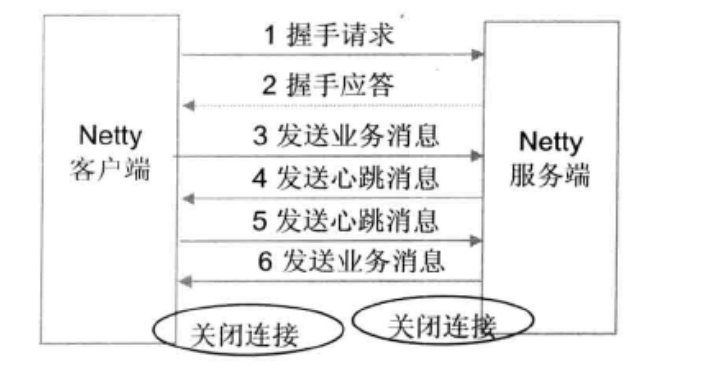
- Netty协议栈客户端发送握手请求消息,携带节点ID等有效身份认证信息
- Netty协议栈服务端对握手消息进行合法性校验,包括节点ID有效性校验、节点重复登陆校验、IP地址合法性校验,校验通过后,返回登陆成功的握手应答消息
- 链路建立成功之后客户端发送业务消息
- 服务端发送心跳消息
- 客户端发送心跳消息
- 服务端发送业务消息
- 服务端退出时,服务端关闭连接,客户端感知对方关闭连接,被动关闭客户端连接
⚠️双方之间的心跳采用PING-PONG机制,当链路处于空闲状态时,客户端主动发送ping消息给服务端,服务端接收到ping消息后发送应答消息pong给客户端,如果客户端连续发送n条ping消息都没有收到服务端返回都pong消息,说明链路已经挂死或者对方处于异常状态,客户端主动关闭连接,间隔周期T后发起重连操作,直到重连成功。
10.2.4 消息定义
Netty协议栈消息定义包含两部分:消息头,消息体。
消息定义
| 名称 | 类型 | 长度 | 描述 |
|---|---|---|---|
| header | Header | 变长 | 消息头定义 |
| body | Object | 变长 | 请求消息 |
消息头定义
| 名称 | 类型 | 长度 | 描述 |
|---|---|---|---|
| crcCode | int | 32 | 0xABEF(2个字节) + 主版本号(1~255 1个字节) + 次版本号(1~255 1个字节) |
| length | int | 32 | 消息长度 |
| sessionID | long | 64 | 集群节点内全局唯一 |
| type | byte | 8 | 类型枚举 |
| priority | byte | 8 | 消息优先级 |
| attachment | Map<String,Object> | 变长 | 可选字段 |
⚠️其中type分别为
0:业务请求消息
1:业务响应消息
2:业务ONE WAY消息
3:握手请求消息
4:握手应答消息
5:心跳请求消息
6:心跳应答消息
10.3 Netty协议栈开发
10.3.1 数据接口定义
首先对Netty协议栈使用到的数据结构进行定义。
NettyMessage
/**
 * 消息
 * @author likecat
 * @version 1.0
 * @date 2022/10/26 10:27
 */
public final class NettyMessage {

    private Header header;

    private Object body;

    public Header getHeader() {
        return header;
    }

    public void setHeader(Header header) {
        this.header = header;
    }

    public Object getBody() {
        return body;
    }

    public void setBody(Object body) {
        this.body = body;
    }

    @Override
    public String toString() {
        return "NettyMessage{" +
                "header=" + header +
                '}';
    }
}
消息头Header
/**
 * 消息头
 * @author likecat
 * @version 1.0
 * @date 2022/10/26 11:35
 */
public class Header {
    private int crcCode = 0xabef0101;

    private int length;

    private long sessionID;

    private byte type;

    private byte priority;

    private Map<String, Object> attachment = new HashMap<>();

    public int getCrcCode() {
        return crcCode;
    }

    public void setCrcCode(int crcCode) {
        this.crcCode = crcCode;
    }

    public int getLength() {
        return length;
    }

    public void setLength(int length) {
        this.length = length;
    }

    public long getSessionID() {
        return sessionID;
    }

    public void setSessionID(long sessionID) {
        this.sessionID = sessionID;
    }

    public byte getType() {
        return type;
    }

    public void setType(byte type) {
        this.type = type;
    }

    public byte getPriority() {
        return priority;
    }

    public void setPriority(byte priority) {
        this.priority = priority;
    }

    public Map<String, Object> getAttachment() {
        return attachment;
    }

    public void setAttachment(Map<String, Object> attachment) {
        this.attachment = attachment;
    }

    @Override
    public String toString() {
        return "Header{" +
                "crcCode=" + crcCode +
                ", length=" + length +
                ", sessionID=" + sessionID +
                ", type=" + type +
                ", priority=" + priority +
                ", attachment=" + attachment +
                '}';
    }
}
由于心跳消息、握手请求和握手应答消息都可以统一由NettyMessage承载,所以不需要单独做数据定义。
10.3.2 消息编解码
分别定义NettyMessageDecoder和NettyMessage用于NettyMessage消息的编解码。
消息编码类
/**
 * 消息编码
 * @author likecat
 * @version 1.0
 * @date 2022/10/26 11:38
 */
public class NettyMessageEncoder extends MessageToByteEncoder<NettyMessage> {
    MarshallingEncoder marshallingEncoder;

    public NettyMessageEncoder() throws IOException {
        this.marshallingEncoder = new MarshallingEncoder();
    }

    @Override
    protected void encode(ChannelHandlerContext channelHandlerContext, NettyMessage msg, List<Object> out) throws Exception {
        if(msg == null || msg.getHeader() == null){
            throw new Exception("The encode message is null");
        }
        ByteBuf sendBuf = Unpooled.buffer();
        sendBuf.writeInt(msg.getHeader().getCrcCode());
        sendBuf.writeInt(msg.getHeader().getLength());
        sendBuf.writeLong(msg.getHeader().getSessionID());
        sendBuf.writeByte(msg.getHeader().getType());
        sendBuf.writeByte(msg.getHeader().getPriority());
        sendBuf.writeInt(msg.getHeader().getAttachment().size());

        String key = null;
        byte[] keyArray = null;
        Object value = null;
        for (Map.Entry<String,Object> param:msg.getHeader().getAttachment().entrySet()) {
            key = param.getKey();
            keyArray = key.getBytes(StandardCharsets.UTF_8);
            sendBuf.writeBytes(keyArray);

            value = param.getValue();
            marshallingEncoder.encode(value, sendBuf);
        }

        key = null;
        keyArray = null;
        value = null;

        if(msg.getBody() != null){
            marshallingEncoder.encode(msg.getBody(), sendBuf);
        }else {
            sendBuf.writeInt(0);
            sendBuf.setInt(4, sendBuf.readableBytes());
        }
    }
}
消息编码工具类
/**
 * 消息编码工具类
 * @author likecat
 * @version 1.0
 * @date 2022/10/26 15:09
 */
public class MarshallingEncoder {

    private static final byte[] LENGTH_PLACEHOLDER = new byte[4];
    Marshaller marshaller;

    public MarshallingEncoder() throws IOException {
        marshaller = MarshallingCodeCFactory.buildMarshalling();
    }

    protected void encode(Object msg, ByteBuf out) throws Exception {
        try {
            // 写入编码信息
            int lengthPos = out.writerIndex();
            out.writeBytes(LENGTH_PLACEHOLDER);
            ChannelBufferByteOutput output = new ChannelBufferByteOutput(out);
            marshaller.start(output);
            marshaller.writeObject(msg);
            marshaller.finish();
            out.setInt(lengthPos, out.writerIndex() - lengthPos - 4);
        } finally {
            marshaller.close();
        }
    }
}
消息解码类
/**
 * 消息解码
 * @author likecat
 * @version 1.0
 * @date 2022/10/26 15:30
 */
public class NettyMessageDecoder extends LengthFieldBasedFrameDecoder {

    MarshallingDecoder marshallingDecoder;

    public NettyMessageDecoder(int maxFrameLength, int lengthFieldOffset,
                          int lengthFieldLength) throws IOException {
        super(maxFrameLength, lengthFieldOffset, lengthFieldLength);
        marshallingDecoder = new MarshallingDecoder();
    }

    @Override
    protected Object decode(ChannelHandlerContext ctx, ByteBuf in)
            throws Exception {
        ByteBuf frame = (ByteBuf) super.decode(ctx, in);
        if (frame == null) {
            return null;
        }

        NettyMessage message = new NettyMessage();
        Header header = new Header();
        header.setCrcCode(frame.readInt());
        header.setLength(frame.readInt());
        header.setSessionID(frame.readLong());
        header.setType(frame.readByte());
        header.setPriority(frame.readByte());

        int size = frame.readInt();
        if (size > 0) {
            Map<String, Object> attch = new HashMap<String, Object>(size);
            int keySize = 0;
            byte[] keyArray = null;
            String key = null;
            for (int i = 0; i < size; i++) {
                keySize = frame.readInt();
                keyArray = new byte[keySize];
                frame.readBytes(keyArray);
                key = new String(keyArray, "UTF-8");
                attch.put(key, marshallingDecoder.decode(frame));
            }
            keyArray = null;
            key = null;
            header.setAttachment(attch);
        }
        if (frame.readableBytes() > 4) {
            message.setBody(marshallingDecoder.decode(frame));
        }
        message.setHeader(header);
        return message;
    }
}
这里用到了Netty的LengthFieldBasedFrameDecoder解码器,它支持自动的TCP粘包和半包处理,只需要给出标识消息长度的字段偏移量和消息长度自身所占的字节数,Netty就能自动实现对半包的处理。
消息解码工具类
/**
 * 消息解码工具类
 * @author likecat
 * @version 1.0
 * @date 2022/10/26 15:27
 */
public class MarshallingDecoder {

    private final Unmarshaller unmarshaller;

    public MarshallingDecoder() throws IOException {
        unmarshaller = MarshallingCodeCFactory.buildUnMarshalling();
    }

    protected Object decode(ByteBuf in) throws Exception {
        int objectSize = in.readInt();
        ByteBuf buf = in.slice(in.readerIndex(), objectSize);
        ByteInput input = new ChannelBufferByteInput(buf);
        try {
            unmarshaller.start(input);
            Object obj = unmarshaller.readObject();
            unmarshaller.finish();
            in.readerIndex(in.readerIndex() + objectSize);
            return obj;
        } finally {
            unmarshaller.close();
        }
    }
}
消息编解码工厂类
/**
 * @author likecat
 * @version 1.0
 * @date 2022/10/26 11:47
 */
public final class MarshallingCodeCFactory {
    /** 创建Jboss Marshaller */
    protected static Marshaller buildMarshalling() throws IOException {
        final MarshallerFactory marshallerFactory = Marshalling
                .getProvidedMarshallerFactory("serial");
        final MarshallingConfiguration configuration = new MarshallingConfiguration();
        configuration.setVersion(5);
        Marshaller marshaller = marshallerFactory.createMarshaller(configuration);
        return marshaller;
    }

    /** 创建Jboss Unmarshaller */
    protected static Unmarshaller buildUnMarshalling() throws IOException {
        final MarshallerFactory marshallerFactory = Marshalling
                .getProvidedMarshallerFactory("serial");
        final MarshallingConfiguration configuration = new MarshallingConfiguration();
        configuration.setVersion(5);
        final Unmarshaller unmarshaller = marshallerFactory
                .createUnmarshaller(configuration);
        return unmarshaller;
    }
}
字节输入实现类
/* channel 字节输入实现类 */
class ChannelBufferByteInput implements ByteInput {

    private final ByteBuf buffer;

    public ChannelBufferByteInput(ByteBuf buffer) {
        this.buffer = buffer;
    }

    @Override
    public void close() throws IOException {
        // nothing to do
    }

    @Override
    public int available() throws IOException {
        return buffer.readableBytes();
    }

    @Override
    public int read() throws IOException {
        if (buffer.isReadable()) {
            return buffer.readByte() & 0xff;
        }
        return -1;
    }

    @Override
    public int read(byte[] array) throws IOException {
        return read(array, 0, array.length);
    }

    @Override
    public int read(byte[] dst, int dstIndex, int length) throws IOException {
        int available = available();
        if (available == 0) {
            return -1;
        }

        length = Math.min(available, length);
        buffer.readBytes(dst, dstIndex, length);
        return length;
    }

    @Override
    public long skip(long bytes) throws IOException {
        int readable = buffer.readableBytes();
        if (readable < bytes) {
            bytes = readable;
        }
        buffer.readerIndex((int) (buffer.readerIndex() + bytes));
        return bytes;
    }

}
字节输出实现类
/* channel 字节输出实现类 */
class ChannelBufferByteOutput implements ByteOutput {

    private final ByteBuf buffer;

    public ChannelBufferByteOutput(ByteBuf buffer) {
        this.buffer = buffer;
    }

    @Override
    public void close() throws IOException {
        // Nothing to do
    }

    @Override
    public void flush() throws IOException {
        // nothing to do
    }

    @Override
    public void write(int b) throws IOException {
        buffer.writeByte(b);
    }

    @Override
    public void write(byte[] bytes) throws IOException {
        buffer.writeBytes(bytes);
    }

    @Override
    public void write(byte[] bytes, int srcIndex, int length) throws IOException {
        buffer.writeBytes(bytes, srcIndex, length);
    }

    /**
     * Return the {@link ByteBuf} which contains the written content
     *
     */
    ByteBuf getBuffer() {
        return buffer;
    }
}
10.3.3 握手和安全认证
握手的发起是在客户端和服务器TCP链路建立成功通过激活时,握手消息的接入和安全认证在服务器端处理。
首先需要一个握手认证的客户端ChannelHandler,用于在通道激活时发起握手请求。
客户端握手认证
/**
 * 客户端握手认证
 * @author likecat
 * @version 1.0
 * @date 2022/10/26 16:21
 */
public class LoginAuthReqHandler extends ChannelHandlerAdapter {

    private static final Logger LOG = Logger.getLogger(LoginAuthReqHandler.class.getName());

    @Override
    public void channelActive(ChannelHandlerContext ctx) throws Exception {
        ctx.writeAndFlush(buildLoginReq());
    }

    @Override
    public void channelRead(ChannelHandlerContext ctx, Object msg)
            throws Exception {
        NettyMessage message = (NettyMessage) msg;

        // 如果是握手应答消息,需要判断是否认证成功
        if (message.getHeader() != null
                && message.getHeader().getType() == MessageType.LOGIN_RESP
                .getCode()) {
            byte loginResult = (byte) message.getBody();
            if (loginResult != (byte) 0) {
                // 握手失败,关闭连接
                ctx.close();
            } else {
                LOG.info("Login is ok : " + message);
                ctx.fireChannelRead(msg);
            }
        } else
            ctx.fireChannelRead(msg);
    }
    //构造登录请求
    private NettyMessage buildLoginReq() {
        NettyMessage message = new NettyMessage();
        Header header = new Header();
        header.setType(MessageType.LOGIN_REQ.getCode());
        message.setHeader(header);
        return message;
    }
    //异常跑错
    public void exceptionCaught(ChannelHandlerContext ctx, Throwable cause)
            throws Exception {
        ctx.fireExceptionCaught(cause);
    }
}
客户端跟服务端TCP三次握手成功之后,由客户端构造握手请求消息发送给服务端。
服务端握手认证
/**
 * 服务端握手认证
 * @author likecat
 * @version 1.0
 * @date 2022/10/26 16:07
 */
public class LoginAuthRespHandler extends ChannelHandlerAdapter {

    private static final Logger LOG = Logger.getLogger(LoginAuthRespHandler.class.getName());
    //缓存框架,用于维护是否登录
    private Map<String, Boolean> nodeCheck = new ConcurrentHashMap<String, Boolean>();
    private String[] whitekList = { "127.0.0.1"};

    @Override
    public void channelRead(ChannelHandlerContext ctx, Object msg)
            throws Exception {
        NettyMessage message = (NettyMessage) msg;

        // 如果是握手请求消息,处理,其它消息透传
        if (message.getHeader() != null
                && message.getHeader().getType() == MessageType.LOGIN_REQ
                .getCode()) {
            String nodeIndex = ctx.channel().remoteAddress().toString();
            NettyMessage loginResp = null;
            // 重复登陆,拒绝
            if (nodeCheck.containsKey(nodeIndex)) {
                loginResp = buildResponse((byte) -1);
            } else {
                InetSocketAddress address = (InetSocketAddress) ctx.channel()
                        .remoteAddress();
                String ip = address.getAddress().getHostAddress();
                boolean isOK = false;
                for (String WIP : whitekList) {
                    if (WIP.equals(ip)) {
                        isOK = true;
                        break;
                    }
                }
                loginResp = isOK ? buildResponse((byte) 0)
                        : buildResponse((byte) -1);
                if (isOK)
                    nodeCheck.put(nodeIndex, true);
            }
            LOG.info("The login response is : " + loginResp
                    + " body [" + loginResp.getBody() + "]");
            ctx.writeAndFlush(loginResp);
        } else {
            ctx.fireChannelRead(msg);
        }
    }

    private NettyMessage buildResponse(byte result) {
        NettyMessage message = new NettyMessage();
        Header header = new Header();
        header.setType(MessageType.LOGIN_RESP.getCode());
        message.setHeader(header);
        message.setBody(result);
        return message;
    }

    public void exceptionCaught(ChannelHandlerContext ctx, Throwable cause)
            throws Exception {
        cause.printStackTrace();
        nodeCheck.remove(ctx.channel().remoteAddress().toString());// 删除缓存
        ctx.close();
        ctx.fireExceptionCaught(cause);
    }
}
首先根据客户端的源地址进行重复登陆判断,如果已经登陆成功,则拒绝重复登录,以防止客户端重复登录导致的句柄泄漏。随后进行白名单校验,校验通过后握手成功,最后通过buildResponse构造握手应答消息。
10.3.4 心跳检测机制
握手成功之后,由客户端主动发送心跳消息,服务端接收到心跳消息之后,返回心跳应答消息。由于心跳消息的目的是为了检测链路的可用性,因此不需要携带消息体。
客户端发送心跳请求消息
/**
 * 客户端发送心跳请求消息
 * @author likecat
 * @version 1.0
 * @date 2022/10/26 16:35
 */
public class HeartBeatReqHandler extends ChannelHandlerAdapter {

    private static final Logger LOG = Logger.getLogger(HeartBeatReqHandler.class.getName());

    private volatile ScheduledFuture<?> heartBeat;

    @Override
    public void channelRead(ChannelHandlerContext ctx, Object msg)
            throws Exception {
        NettyMessage message = (NettyMessage) msg;
        // 握手成功,主动发送心跳消息
        if (message.getHeader() != null
                && message.getHeader().getType() == MessageType.LOGIN_RESP
                .getCode()) {
            heartBeat = ctx.executor().scheduleAtFixedRate(
                    new HeartBeatReqHandler.HeartBeatTask(ctx), 0, 5000,
                    TimeUnit.MILLISECONDS);
        } else if (message.getHeader() != null
                && message.getHeader().getType() == MessageType.HEARTBEAT_RESP
                .getCode()) {
            LOG.info("Client receive server heart beat message : ---> "
                    + message);
        } else
            ctx.fireChannelRead(msg);
    }

    private class HeartBeatTask implements Runnable {
        private final ChannelHandlerContext ctx;

        public HeartBeatTask(final ChannelHandlerContext ctx) {
            this.ctx = ctx;
        }

        @Override
        public void run() {
            NettyMessage heatBeat = buildHeatBeat();
            LOG.info("Client send heart beat message to server : ---> "
                    + heatBeat);
            ctx.writeAndFlush(heatBeat);
        }

        private NettyMessage buildHeatBeat() {
            NettyMessage message = new NettyMessage();
            Header header = new Header();
            header.setType(MessageType.HEARTBEAT_REQ.getCode());
            message.setHeader(header);
            return message;
        }
    }

    @Override
    public void exceptionCaught(ChannelHandlerContext ctx, Throwable cause)
            throws Exception {
        cause.printStackTrace();
        if (heartBeat != null) {
            heartBeat.cancel(true);
            heartBeat = null;
        }
        ctx.fireExceptionCaught(cause);
    }
}
当握手成功之后,握手请求Handler会继续将握手成功消息向下透传,HeartBeatReqHandler接收到之后对消息进行判断,如果是握手成功消息,则启动无限循环定时器用于定期发送心跳。由于NioEventLoop是一个Schedule,因此它支持定时器的执行。默认5000ms发送一次心跳。
服务器心跳应答
/**
 * 心跳消息服务端
 * @author likecat
 * @version 1.0
 * @date 2022/10/26 18:06
 */
public class HeartBeatRespHandler extends ChannelHandlerAdapter {

    private static final Logger LOG = Logger.getLogger(HeartBeatRespHandler.class.getName());
    @Override
    public void channelRead(ChannelHandlerContext ctx, Object msg)
            throws Exception {
        NettyMessage message = (NettyMessage) msg;
        // 返回心跳应答消息
        if (message.getHeader() != null
                && message.getHeader().getType() == MessageType.HEARTBEAT_REQ
                .getCode()) {
            LOG.info("Receive client heart beat message : ---> "
                    + message);
            NettyMessage heartBeat = buildHeatBeat();
            LOG.info("Send heart beat response message to client : ---> "
                    + heartBeat);
            ctx.writeAndFlush(heartBeat);
        } else
            ctx.fireChannelRead(msg);
    }
    //心跳构造器
    private NettyMessage buildHeatBeat() {
        NettyMessage message = new NettyMessage();
        Header header = new Header();
        header.setType(MessageType.HEARTBEAT_RESP.getCode());
        message.setHeader(header);
        return message;
    }
}
服务端接收到心跳请求消息之后,构造心跳应答消息返回,并打印接收和发送的心跳消息。
心跳超时的实现非常简单,直接利用Netty的ReadTimeoutHandler机制,当一定周期内没有读取到对方任何消息时,需要主动关闭链路。如果是客户端,重启发起连接,如果是服务端,释放资源,清除客户端登陆缓存信息,等待客户端重连。
10.3.5 断连重连
当客户端感知断连事件之后,释放资源,重新发起连接。
具体实现为首先监听网络断连事件,如果Channel关闭,则执行后续的重连任务,然后重启发起连接,客户端挂在closeFuture上监听链路关闭信号,一旦关闭,则创建重连定时器,5s之后重新发起连接,直到重连成功。
服务端感知到断连事件之后,需要清空缓存的登陆认证注册信息,以保存后续客户端能够正常连接。
客户端
/**
 * 客户端
 * @author likecat
 * @version 1.0
 * @date 2022/10/27 10:47
 */
public class NettyClient {

    private static final Logger LOG = Logger.getLogger(NettyClient.class.getName());
    private ScheduledExecutorService executor = Executors
            .newScheduledThreadPool(1);
    EventLoopGroup group = new NioEventLoopGroup();

    public void connect(int port, String host) throws Exception {
        // 配置客户端NIO线程组
        try {
            Bootstrap b = new Bootstrap();
            b.group(group).channel(NioSocketChannel.class)
                    .option(ChannelOption.TCP_NODELAY, true)
                    .handler(new ChannelInitializer<SocketChannel>() {
                        @Override
                        public void initChannel(SocketChannel ch)
                                throws Exception {
                            ch.pipeline().addLast(
                                    new NettyMessageDecoder(1024 * 1024, 4, 4));
                            ch.pipeline().addLast("MessageEncoder",
                                    new NettyMessageEncoder());
                            ch.pipeline().addLast("readTimeoutHandler",
                                    new ReadTimeoutHandler(50));
                            ch.pipeline().addLast("LoginAuthHandler",
                                    new LoginAuthReqHandler());
                            ch.pipeline().addLast("HeartBeatHandler",
                                    new HeartBeatReqHandler());
                        }
                    });
            // 发起异步连接操作
            ChannelFuture future = b.connect(
                    new InetSocketAddress(host, port),
                    new InetSocketAddress(NettyConstant.LOCALIP,
                            NettyConstant.LOCAL_PORT)).sync();
            // 当对应的channel关闭的时候,就会返回对应的channel。
            future.channel().closeFuture().sync();
        } finally {
            // 所有资源释放完成之后,清空资源,再次发起重连操作
            executor.execute(new Runnable() {
                @Override
                public void run() {
                    try {
                        TimeUnit.SECONDS.sleep(1);
                        try {
                            connect(NettyConstant.PORT, NettyConstant.REMOTEIP);// 发起重连操作
                        } catch (Exception e) {
                            e.printStackTrace();
                        }
                    } catch (InterruptedException e) {
                        e.printStackTrace();
                    }
                }
            });
        }
    }

    public static void main(String[] args) throws Exception {
        new NettyClient().connect(NettyConstant.PORT, NettyConstant.REMOTEIP);
    }
}
服务端
/**
 * 服务端
 * @author likecat
 * @version 1.0
 * @date 2022/10/27 11:26
 */
public class NettyServer {
    private static final Logger LOG = Logger.getLogger(NettyServer.class.getName());

    public void bind() throws Exception {
        // 配置服务端的NIO线程组
        EventLoopGroup bossGroup = new NioEventLoopGroup();
        EventLoopGroup workerGroup = new NioEventLoopGroup();
        ServerBootstrap b = new ServerBootstrap();
        b.group(bossGroup, workerGroup).channel(NioServerSocketChannel.class)
                .option(ChannelOption.SO_BACKLOG, 100)
                .handler(new LoggingHandler(LogLevel.INFO))
                .childHandler(new ChannelInitializer<SocketChannel>() {
                    @Override
                    public void initChannel(SocketChannel ch)
                            throws IOException {
                        ch.pipeline().addLast(
                                new NettyMessageDecoder(1024 * 1024, 4, 4));
                        ch.pipeline().addLast(new NettyMessageEncoder());
                        ch.pipeline().addLast("readTimeoutHandler",
                                new ReadTimeoutHandler(50));
                        ch.pipeline().addLast(new LoginAuthRespHandler());
                        ch.pipeline().addLast("HeartBeatHandler",
                                new HeartBeatRespHandler());
                    }
                });

        // 绑定端口,同步等待成功
        b.bind(NettyConstant.REMOTEIP, NettyConstant.PORT).sync();
        LOG.info("server start ok : "
                + (NettyConstant.REMOTEIP + " : " + NettyConstant.PORT));
    }

    public static void main(String[] args) throws Exception {
        new NettyServer().bind();
    }
}